This is another one of those items that is really just for myself, because it will certainly come up again…
I have a Synology NAS I use for backups, and once in awhile you end up with a filesystem error that it can’t fix, so the recommended solution is to copy everything off the backup volume, reformat the drives/volume and copy everything back (which I’ve done a couple times over the years). Most recently, one of the hard drives failed in the RAID (no biggie, popped in a new one and it rebuilt itself as expected), but also ended up with some filesystem errors for whatever reason. I decided this time I was going to figure out how to fix it without copying everything off and back on to it.
It’s currently running DSM 7.1.1, so what I did may or may not work for other versions (and I should also point out that this post is intended as a reminder to myself, I don’t recommend anyone doing it to their own system).
Step 1: Enable Telnet on the NAS (you can’t do this over SSH because of how some processes work, not going to go into the details here).
Step 2: Telnet in and shut down PostgreSQL via (the PostgreSQL service will automatically restart, preventing the volume from being unmounted): sudo systemctl stop pgsql
Step 3: Unmount the volume: sudo umount -f -k /volume1
This is one of those things that I *probably* won’t ever need to do again, but just in case I do, I can come back here to remind myself rather than figuring it out all again.
I have a use case where I need to have a Monero view-only wallet, but spending is only possible with a hardware wallet. Normally a hardware wallet won’t tell you your private view key (needed for a view-only wallet) because it tries to save you from yourself and “protect your privacy”.
In my case, I need an automated process to generate new Monero addresses so we know which customer sent funds (the deposit addresses are unique to each customer and we are able to cross-reference the address to the customer on our end). I also want to protect the private keys for the wallet so in a worst-case-scenario where the server was compromised, a hacker couldn’t steal the funds in the wallet.
A standard hardware wallet can’t generate addresses without a human because you need to physically confirm to export the private view key with the hardware wallet (a Ledger in my case). I’m not particularly worried about privacy issues if the server was hacked and the private view key were compromised (it’s for legitimate business purposes and taxes are paid, and if the server was hacked someone seeing how much Monero came in from customers is the least of my concerns).
A few hours of sifting through source code for Ledger’s Monero App, and I was able to reverse engineer the command wallets use to export the private view key (normally kept in memory and not disclosed to users).
TL;DR
I was able to keep the private keys solely in the hardware wallet for spending (always done with a human and the physical wallet), but also able to programmatically generate deposit addresses on the fly without a human by using Ledger’s library to interact with Ledger devices with the following shell command:
That command triggers a prompt on your hardware device to export your view key. If you confirm that, it outputs your private view key with 4 extra characters appended to it (don’t care enough to figure out what the purpose of those last 4 characters are, easy enough to just ignore them).
Now you can generate a view-only wallet using that private view key like so:
I have two XServe G5 servers that I haven’t used as web/database servers in a long time, but I do use them for other stuff (backup destination, historical monitoring of other hardware, etc.)
I haven’t had any problems with them in the 11 years that I’ve had them, except now both died within a week of each other (specifically, both power supplies died). Which I guess says something about manufacturing consistency to have both die at the same time. 🙂
I had a new spare because way back in the day I bought the XServe service parts kit (included spare motherboard, power supply, fans, etc.), so getting one of them back online was no big deal. Searching around to buy another one, and the power supplies are like $400. Yeah, no thanks… not for a machine that probably isn’t even worth that much as a whole.
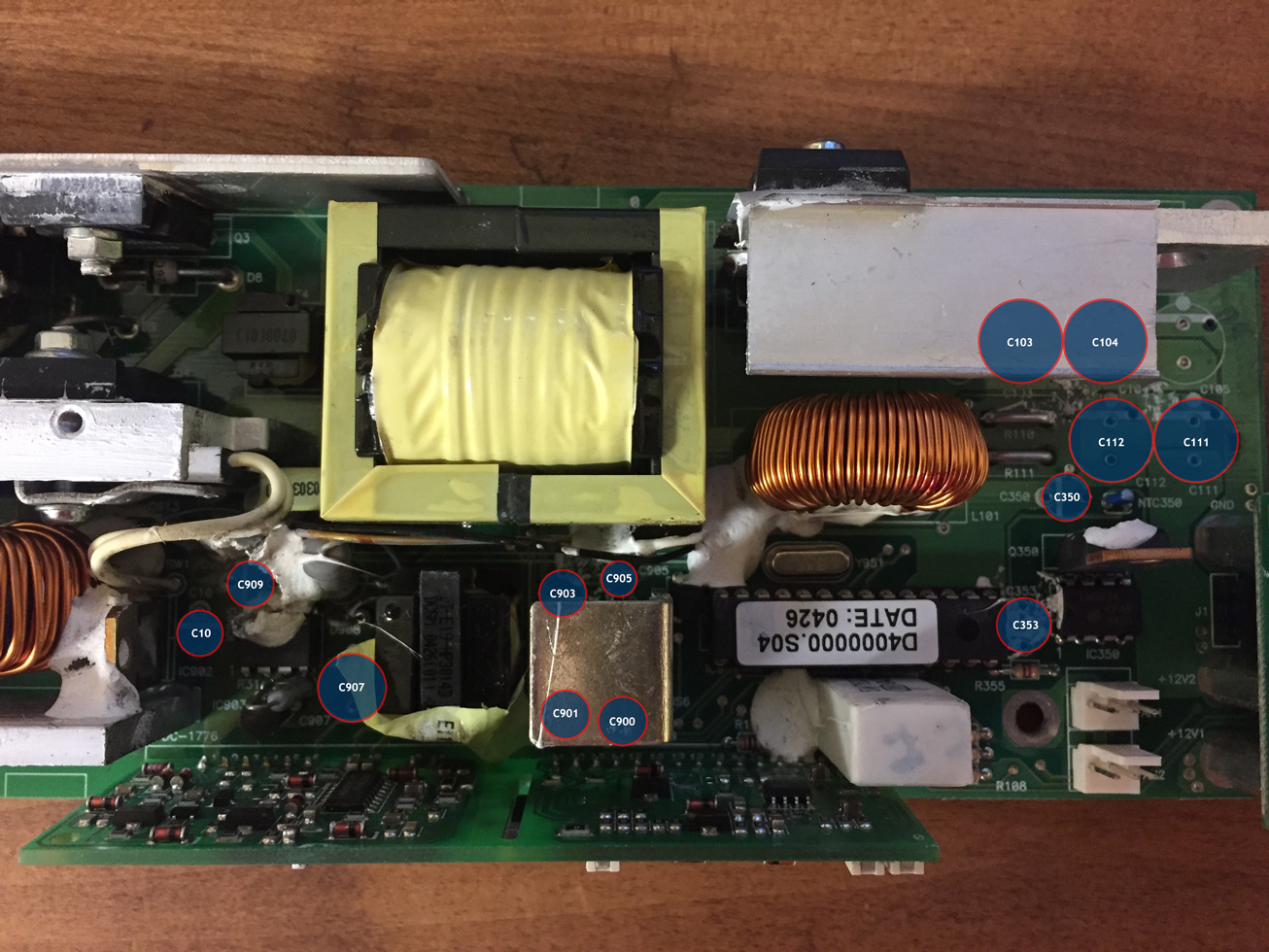
So instead of spending $400, let’s see how nerdy I can be and just replace all the capacitors in the power supply for closer to $10 in parts and see what happens… You could actually get the parts for $1-2 if you are okay with getting junky capacitors, but probably a good idea to replace capacitors in a server power supply with good ones. 🙂
The place I got my capacitors didn’t have the 1uF or 10uF radial ones I needed, so I ended up getting a tantalum capacitor for the 1uF one and then a radial 10uF 50V instead of the 25V (you can use a higher voltage as long as the microfarad rating is the same).
First off, let me say that I love CloudFlare… and coming from me, that probably means something because there aren’t a lot of third party services that I think are great. But CloudFlare is one of those.
That being said, I still have a list of things I wish CloudFlare did (or did differently):
Have a “failover host” option for individual DNS records. For example route to host X, but if host X is down, route to host Y. Yes, I know you can do DNS management with the CloudFlare API, and I built a system that monitors servers and switches them if needed via DNS API. Just would be simpler if we had a “failover host” option.
Allow wildcard domain records to route through CloudFlare. This would be way more convenient.
Make the Authy two-factor code last longer (like 30 days for that computer?). It’s obnoxious that you have to generate a new two-factor code while being on the same computer every other day.
Geotargeting granularity. It would be nice if CloudFlare could geotarget more than the country… like long/lat/city level would be nice.
WebSockets support. Yes, I know it supports WebSockets for Enterprise users… and while I’m on a paid plan, I’m not on the Enterprise tier. Update: from the comments on this blog post, it looks like it might be coming. Yay!
Prepayment. For paid plans, I don’t know what happens if your monthly payment doesn’t go through for some reason, but I don’t want to find out. It would be nice if you could just be like, “I want to prepay for the next year so there’s no service interruption”.
Use HTTP/2 To Origin. Cloudflare doesn’t use SPDY or HTTP/2 to the origin server even when available. See: this tweet
Sync Data Centers. Cloudflare data center caching is great, but as more and more data centers come online, the benefit diminishes. Right now there are 74 Cloudflare data centers, which means a resource is requested 74 times (once per data center) for caching.
Email routing. It would be nice if you didn’t have to expose your server’s true IP addresses when sending an email (or just from your SPF records in your DNS). Having a service that lets your mail servers relay email through and erase the originating IP from the email header in the process would be super fantastic. Probably would be problematic because of potential spam implications, but it sure would be nice to have truly hidden server IPs without needing to get separate servers in a separate location for email.
CloudFlare is super rad and if you own a website without using it (even their free plan), you are doing it wrong. 🙂
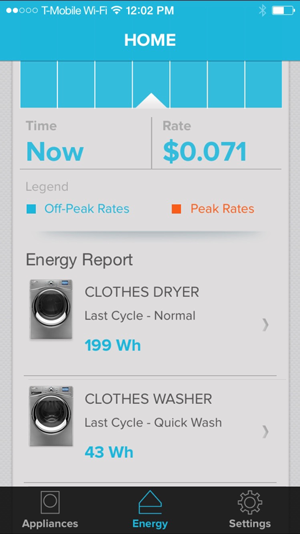
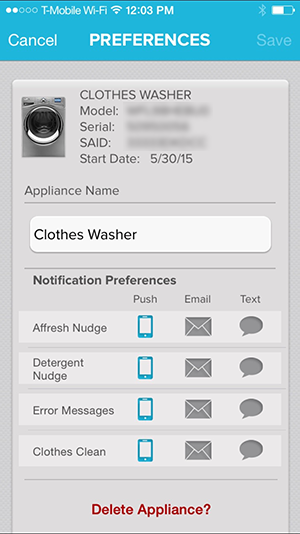
My drier died recently, so it was time to buy a new washer and drier set. I ended up getting the new Whirlpool “smart” washer and drier with their “6th Sense Live” or whatever you want to call it. Basically they allow you to manage and view energy usage, have a companion mobile app, allow you to schedule the best times to run (based on electricity rates in your area), etc. For reference, the washer is model: WFL98HEBU, and the drier is model: WEL98HEBU.
The electricity saving stuff wasn’t a huge deal for me since I’m on solar and generate more electricity than I use. But being a stats nerd and a nerd in general, the other stuff sounded straight pimpin’.
Got them installed without any issues… fired them up and after poking around in the menus, I couldn’t find anywhere where you could configure it’s network connectivity (which I know they have/need). Opened up the manuals even (lol, wut???), and not a single word or mention of how to get these things on the network. If you don’t believe, me you can look at the manual online over here.
There was no “separate manual”, no nothing for connecting these things.
Finally, after mucking with the interface to no avail for about an hour, I opened up the door to get the model number so I could Google about how to set it up. Also nothing… WTF? Is this thing a scam? Does it not really even have connectivity?
Low and behold, I when opening the door, I noticed something… a sticker with some info… the Mac address, SSID and SAID. So I’m thinking to myself, “Why does this thing have an SSID? Does it have a wifi base station?” Sure enough, after grabbing my iPhone, and looking for wifi networks, there were 2 new wifi networks near me… one for the washer and one for the drier. If you try to log into them, they require a password… which just happens to work with the SAID on that sticker. Open up a web browser and you are given nothing but an option but to connect to the real wifi network (and you can enter a password for it). Rinse and repeat for the drier, and we are online! Sure would have been nice for them to mention that in the manuals.
Here’s the short version of this story… if you don’t know how to get your WFL98HEBU washer or WEL98HEBU drier connected to the Internet, they have their own networks you need to log into in order to configure their connectivity.
That being said, it’s a pretty cool washer/drier pair even if the manual sucks.
So I had an issue where ndb_restore was utterly failing and made it so it was impossible to restore ndbcluster tables from a backup. Trying to use it was flooding us with all sorts of sporadic errors…
[NdbApi] ERROR — Sending TCROLLBACKREQ with Bad flag
—————
theNoOfSentTransactions = 1 theListState = 0 theTransArrayIndex = 5
—————
Temporary error: 410: REDO log files overloaded (decrease TimeBetweenLocalCheckpoints or increase NoOfFragmentLogFiles)
—————
Temporary error: 266: Time-out in NDB, probably caused by deadlock
—————
Finally was able to work it out, but man, can I just say that ndb_restore really could use an overhaul to make it a little more friendly? Okay, go! 🙂
So I’ve been trying to find good LED replacements for the incandescent candelabra bulbs I have at my house (422 of them).
Last year the Phillips 2700K was the best I could find, but I still hated it. It’s ugly and gives off a weird purplish light… Yeah no thanks.
Earlier this year I tried one of the Archipelago 2700K LEDs… Eh… Kind of greenish light.
On top of it, I wanted something warmer than 2700K, which seemed impossible to find.
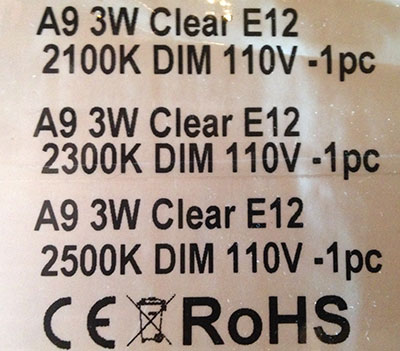
Finally I called China… Straight to an LED manufacturer, and they were able to send samples at 3 different color temperatures… 2100K, 2300K and 2500K.
And guess what? The 2300K is perfect… I finally found the perfect LED candelabra. Good color temp, the bulb itself isn’t ugly, dims just fine, etc… Needless to say, I ordered 422 of them direct from the manufacturer and they are about half the cost of anything else to boot.
40 watt bulbs going down to 3 watts as soon as the order is delivered. 🙂
So I wanted to upgrade WordPress so I could mess with rel=”author” stuff here as well as toss up the social button widget I built to see how it works for third-party sites. Seems to be working, so yeah… word.
Oh, if you want to try the social button widget thing out on your own site, feel free. They are super lightweight, and injected straight into the DOM so you can do things like control the look/feel with CSS/JavaScript.
This is mostly a reminder to myself… but maybe someone else will find it useful as well.
I migrated some databases to ndbcluster (some of the tables were fairly decent sized… 9GB for 1 table spanning 220M records), and was running into a problem where an ALTER TABLE to change the storage engine was spewing out some cryptic error message like so:
Cryptic mainly because it was coming from MyISAM, which doesn’t have record locking. Long story short is it’s not a setting in your my.ini file for mysqld, rather a setting in your config.ini for ndbd. The TransactionDeadlockDetectionTimeout setting defaults to 1200 (1.2 seconds), I ended up raising it to 24 hours just for purposes of migrating existing tables to ndbcluster (the setting of 86400000 ms is 24 hours).
Being relatively new to MySQL Cluster, it was also a good opportunity to practice making a config change and doing a rolling restart of the ndbd nodes to have no downtime.
So this has been driving me mad since I installed Mac OS X 10.7… Any time Cacti tried to output a graph, it would output, but it was painfully slow (like 30 seconds)… prior to installing 10.7, it was a fraction of a second.
Anyway… long story short is apparently RRDtool pulls the list of fonts from the system, and since it was running as the _www user, it was unable to write a the font cache to disk to make future font access fast.
Logging in as root and running the “fc-list” command to get a list of installed fonts fixed the problem. The first time it ran it took 30 seconds (imagine that! heh), and subsequent times it was instant. And Cacti graphs are back to being instant. Hopefully this helps someone…
Seagate is still not producing the hard drives I want for new servers in sufficient quantity, but they do seem to be actually producing them now. I’ve seen places where I can get 30 of them lately… but I need 72.
I’m assuming I’ll be able to get them relatively soon and have started to think about how I want to lay the servers out architecturally.
As far as hardware goes, gigabit ethernet just really isn’t that fast these days… Real world use has being able to pass about 80MB/sec (theoretical maximum is about 110MB/sec). When you have a cluster of servers passing massive amounts of data amongst themselves, 80MB/sec just doesn’t cut it. Which is why the servers have Infinband QDR (40Gbit interconnects), so they should be able to pass 3.5GB/sec (ish) between themselves.
For software/services, I’m thinking maybe 12 identical servers that are more or less service agnostic… with each server being a web server, MySQL Cluster data node and a MySQL Cluster SQL node. Then each server could probably be setup to handle 10,000 concurrent HTTP connections as well as 10,000 DB connections (1 per HTTP connection). With 12 servers, you could have the capacity of 120k concurrent web connections, 120k DB connections capable of doing millions of SQL queries/sec. If you need more capacity with anything, you could just bring online additional agnostic servers.
This of course is just in theory… who knows how it will test out in actual use, but it does seem like something worth testing at least.
Now the latest plan for debt reduction goes something like this… “We will only borrow and extra $800,000,000,000 per year instead of $1,200,000,000,000.” And it’s being billed as “saving $3 trillion over the next 10 years”. Last time I saved money, it was money I DIDN’T spend at all.
Let’s say I have $10,000 to my name, and I wanted to buy a new phone for $176,400 (the price of a Princess Plus iPhone)…
It’s $166,400 more than I can afford, so I decide to take out a loan for it. I decide that I’m going to instead get the less expensive version for $66,150 (less quality diamonds), so I only need a loan for $56,150.
I don’t know much about math, but I DO know that I’m amazing… I only had $10,000 to my name, yet I was able to save $110,250! If I do this every year for 10 years, I can save $1,102,500.
I’m a FUCKING GENIUS… I just solved my lifelong debt problem! The amount of money I can save is limitless.
I had a switch that “lost” it’s operating system and was stuck in a reboot loop. Long story short is I needed to upload the OS via a direct serial connection to fix it. I didn’t have a Windows machine available, so I used my Mac and a Keyspan USA-19 (USB -> DB9) thingie (heh). This is mostly a note for myself in case I need to ever do it again, and I forget.
Things that did not work…
ZTerm let me get to the console just fine, but uploading the firmware with XModem failed for some reason (and you only found out it failed after a 3.5 hour upload time).
Keyspan device on Windows via Parallels (from all the Googling I did, apparently it’s just an known issue with that piece of hardware and Parallels and the drivers will not recognize it).
Virtual serial port in Windows/Parallels via a app called SerialClient (it was very difficult to find this app since the site that made it doesn’t exist anymore… people running Parallels said this worked for them, but it was many years ago… so maybe it was an older version of Mac OS X. Either way, I couldn’t get the app to “connect”.).
What DID work (thank God because I was running out of options)…
Download/compile/install lrzsz via ./configure;make;make install.
From Terminal: screen /dev/tty.Keyserial1 57600
Hit CONTROL+A
Type: :exec !! lsx -b -X ~/firmware_image.ros
It was infinitely faster than ZTerm (about 15 minutes vs. 3.5 hours), but more importantly it actually WORKED.
Sadly, 12GB in a server just isn’t what it used to be and the database servers are really starting to feel strained as they beg for more memory. Handling ~25GB of databases on servers with 12GB is just no bueno. I thought of upgrading the RAM in the blades, but the maximum RAM the BIOS supports is 16GB, and all the DIMM slots are in-use… so it more or less would mean tossing all the existing RAM and buying 160GB of new RAM. In the end spending that much money to gain 4GB per server isn’t really worth it (especially since 16GB wouldn’t really be enough either).
I started to do a little research on what would be some good options for upgrades… I think I want to stay away from blades simply because we did have the daughter card in the chassis fail once which took down all 10 blades (the daughter card controls the power buttons). Buying 2 complete sets of blades/chassis is overkill just so you have stuff still up if one complete chassis goes down. The “must haves” on my list are hot swappable drives with hardware RAID, hot swappable redundant power supply, some sort of 10Gbit/sec (or higher) connectivity for communicating between servers. On top of it all, the servers need to be generally “dense” (I don’t want to take an entire rack of space).
PowerEdge C6100
The Dell C6100 actually looked really nice at first glace…
Pros
Super dense (4 servers in a 2U package)
Redundant power supplies (hot swap)
24 (!!) hot swap drives
Supports 10GbE or even QDR Infiniband (40Gbit/sec
Cons
Age – the server itself came out about 18 months ago without any refresh. That means you have hard drive options and CPU options that are a year and a half old
Price – OMG… a single unit loaded up with 4 nodes, drives, RAM, Infiniband, etc. works out to $54,709 (before tax).
The age factor really becomes an issue when it comes to the disk drives… you can get 15k rpm drives in a 2.5″ form factor, but Dell only offers 146GB models (there are 300GB models now). The CPU isn’t really too bad… Dell’s fastest offering is the Xeon X5670… 2.93Ghz, 6 core @95 watts (wattage is important because of so much stuff crammed in there). There is a slightly faster 95 watt, 6 core processor these days… the Xeon X5675… the same thing basically, just 3.06Ghz. 0.13Ghz speed difference isn’t a huge deal… but the hard drive difference is a big deal.
I started to think… well maybe I could just order it stripped down and then I could just replace the CPU/hard drives with better stuff. Doing that, you still end up spending about $60,000 because you end up with 8 Xeon processors (valued at about $1,500 each that you just are going to throw away).
Then I started to think harder… Wait a minute… Dell doesn’t even make their own motherboards (at least I don’t think so)… so maybe I could find the source of these super dense motherboards and build my own systems (or just find the source of something similar… which ended up being the case).
SuperServer 2026TT-H6IBQRF
What do we have here??? The Supermicro SuperServer 2026TT-H6IBQRF is more or less the same thing… 4 servers per 2U, hot swap hard drives, same BIOS/chip/controllers… supports the same Xeon processor family (up to 95 watts)… And as a bonus, Infiniband QDR is built in (it’s a $2,596 add-on for the Dell server) as well as an LSI MegaRAID hardware RAID card (a $2,156 add-on for the Dell server).
So let’s add up the cost to build one of these things with the CPU/hard drives I actually would WANT…
Chassis (includes 4 motherboards, 2 power supplies, hard drive carriers, etc. – $4,630.98
Xeon X5675 3.06Ghz CPU – $1,347.84 each, so $10,782.72 for 8
8GB ECC/Reg DIMM – $124.26 each, so $5,964.48 for 48
600GB Seagate Savvio 10K.5 – $391 each, so $9,384 for 24 (also 410% more capacity, 21% faster and 20% more reliable than the 146GB options from Dell)
Add It All Up…
$30,761.88 would be the total cost (a savings of $24,138.82) and in the end you get slightly faster CPUs and *way* better hard drives. So in a single 2U package, you end up with 48 Xeon cores at 3.06Ghz, 384GB of 1333Mhz memory, 14.4TB of drive space (9.6TB usable after it’s configured as double redundant parity striping with RAID-6… which should be able to do more than 750MB/sec read/write). 8 gigabit ethernet ports and 4 Infiniband QDR (40Gbit) I/O.
Get 2 or 3 of those rigs, and you have some nasty (in a good way) servers that would be gloriously fun to run MySQL Cluster, web servers and whatever else you want.
So I was in a situation where I want to upgrade the operating system on 10 blade servers that are in a data center. The problem is I really didn’t want to sit there and install the new operating systems on each one by one. The other issue is the servers don’t have CD/DVD drives in them since are blades.
I have a couple older Xserve G5s in the facility, so I figured why not use them as network boot servers for the Linux machines? By default OS X Server has a service for NetBoot (which is not the same thing and can really only be used to boot other Mac machines). But Mac OS X Server also has all the underlying services already installed to make it able to be a server for PXE booting from normal Intel BIOS.
So what network services do we need exactly (at least for how I did it)? DHCP, NFS, TFTP and optionally Web if you do an auto-install like I did.
Preface
This was written up in about 5 minutes mostly so I wouldn’t forget what I did in case I needed to do it again. Some assumptions are made like you aren’t completely new to Linux/Mac OS X administration. You can also have pxelinux boot to a operating system selection menu and some other things, but for what *I* wanted to do, I didn’t care about being able to boot into multiple operating systems/modes.
Setting Up The Server
Mac OS X Server makes it really simple to get DHCP, NFS and Web servers online since the normal Server Admin has a GUI for each.
Mac OS X has a TFTP server installed by default, but there it’s not running by default and has no GUI. You can of course enable/configure it from the shell, but just to make things simple, there is a free app you can download that will make configuring and starting the TFTP service simple (the app is just a configuration utility, so it does not need to run once you are finished, so adds no overhead). You can grab the app over here.
Files Served By TFTP
I was installing openSUSE 11.4, so that is what my example revolves around… most Linux installations should be similar, if not identical. First, make sure you have syslinux, which you probably already have since most Linux distributions install it by default.
Copy /usr/share/syslinux/pxelinux.0 to your Mac OS X TFTP Server: /private/tftpboot/pxelinux.0
Create a directory on your Mac OS X Server: /private/tftpboot/pxelinux.cfg, and then create a file named default within that folder with the following:
Obviously change the IP address to your Mac OS X Server IP address. The autoyast part is optional and only needed if you have an auto-configuration file for YaST.
Now we want to grab two files from the installation DVD/.iso so we have the “real” kernel.
Copy /boot/x86_64/loader/linux from the installation DVD to your Mac OS X TFTP Server: /private/tftpboot/osuse11-4.krnl (notice the file rename)
Copy /boot/x86_64/loader/initrd from the installation DVD to your Mac OS X TFTP Server: /private/tftpboot/osuse11-4.ird (notice the file rename here too)
Special Options For DHCP Server
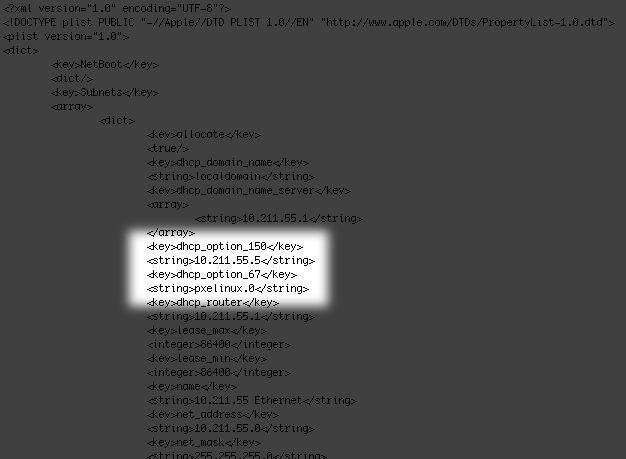
There is not a GUI for adding special options to the DHCP server, but it’s easy enough to add them manually. Just edit the /etc/bootpd.plist file, and add two keys/values to it (option 150 is the IP address of your TFTP server, option 67 is the kernel file name the TFTP server is serving):
NFS Sharing Of Installation DVD
Edit your /etc/exports file, and add the following line to it:
/images/opensuse10-4 -ro
Then just copy the contents of the entire installation DVD to /images/opensuse10-4. You can of course just do a symlink or something if you want.
Cross Your Fingers…
Hopefully if all goes well, you should see something along the lines of this when you choose to network boot a machine (for purposes of this video, I did it in a virtualized environment of Parallels so I didn’t need to boot any running servers):
So I heard that AT&T is going to start putting monthly usage caps on it’s Internet users (which is me), so it got me thinking about how much I actually pay for AT&T services…
I have AT&T fiber to my house (actual fiber to the premise), so I use U-verse for TV and Internet in my house, so it’s break this down (I’m not including any on-time costs or fees/taxes)…
Television
I pay $138/month for TV (includes set top box rentals). I only watch MAYBE 8 hours of TV per month, but it’s nice to have it when you actually want to watch it. So I pay AT&T $17.25/hour to watch TV.
Cell Phone
I pay $159.99/month for 2 cell phones. Last month I used 17 minutes (which is actually more than normal). So I pay AT&T $9.41/minute for cell phone service. Oh yeah, I also paid them $125 for a MicroCell because their service is so crappy.
Internet
I pay $55/month for Internet because I can only get 18Mbit to my house (remember… I have AT&T fiber straight into my house). I’d like to pay for the $65/month plan to give me 24Mbit, but you know… it’s hard to get more bandwidth out of fiber I guess. I really wish Verizon would buy AT&T’s fiber to my house so I could get FiOS (they offer 150Mbit down/35Mbit up already and I heard they are testing 1Gbit up/down). Meanwhile I’ll be stuck at DSL speeds with my fiber. Sweet.
Mobile Internet
Now if I want a 3G connected iPad, that would be another $25/month (and I would rarely use it… so probably would be about $25/hour).
If I want tethering enabled on one of my phones, that’s another $20… even though I already pay for an unlimited data plan on that phone. lol
It would be nice if I could just pay $10/hour to use whatever I want… TV, cell phone, cell phone tethering, iPad connectivity, etc.
I was building a website for Digital Point Ads, and for what I wanted it to do, I figured Flash would be the way to go. So it was built, and worked fine in Flash.
The problem is that I’m an anal perfectionist and the Flash object was eating 80-90% of a computer’s CPU when being viewed… and me being me, I couldn’t just be okay with that.
…so I rebuilt it with CSS3/HTML5/jQuery. It turned out much nicer in my opinion, only uses about 1% of the resources that Flash needed and as an unintentional bonus, it works on things like iPad and phones/computers without Flash support.
I’m not anti-Flash (as I said, I *wanted* to do the site with Flash), but I AM anti-inefficient. There are still some things you can’t do with HTML5 that you can do with Flash, but those things are becoming fewer and fewer it seems.
So I figured it was about time to update WordPress. Went from WordPress 1.5 (haha!) to the latest (WordPress 3.0.1). I gotta say it’s quite a bit nicer now. 😉
Note: This was moved from blogs.digitalpoint.com to here, because well… blogs.digitalpoint.com is no longer a sub-domain we use (user blogs were wiped when we migrated to XenForo).
I haven’t said much about it to date about the dealings between myself and eBay, because well… I didn’t see a point. But now with people’s imaginations running wild about what did (and didn’t) happen, I suppose I’ll talk about it. The story itself is far more interesting than you would think possible within an affiliate program.
The Beginning
I started doing things with the eBay affiliate program in the fall of 2004. On October 20, 2004, I decided I would see if I could rank well for one of the “holy grail” SEO keywords… “eBay“. On November 9, 2004, I was in the top 10 in Google for “ebay”… specifically I was #9 (at the time, the top 50 results were just the various official eBay sites for various countries). On December 10, 2004, I held the #4 *and* #5 position in Google for the keyword “eBay” and this was a position I held in Google until April, 2006 (when Google updated their algorithm, and I no longer cared about the ranking). I also held the #1 spot for other things like, “eBay Registration” (even higher than ebay.com’s registration page). The rankings were partially done with the Co-op Ad Network. People saw me outranking eBay’s own domain for the keyword “eBay” and in December of 2004 the Ad Network exploded in popularity. All of a sudden we had hundreds of millions of pages on the Internet serving billions of Ad Network ads every day.
I got the attention of eBay because my affiliate income was going crazy and they assigned someone to be my “go to” person for anything I needed within the eBay program. This person was assigned to me in early 2005.
Personally I was more than happy with the income I was getting as an eBay affiliate, but eBay was not and helped me come up with new/innovative ideas for driving more traffic to eBay.
Spring 2005
Due to the overwhelming popularity and reach of the Ad Network, eBay came up with the idea in the spring of 2005 that we should use our ad network for more than just helping people rank well in search engines. The logic was that we are serving billions of ads every day, so why not use it as a traditional advertising delivery system? It made sense, so we tried it out by using a small percentage of the Ad Network ad space to serve up tens of millions of eBay ads every day that ultimately were affiliate links. Affiliate income jumped another 300% around that time (as expected).
Summer 2005
eBay was pleased… they were getting massive amounts of traffic and it sure made their affiliate program look good. In the summer of 2005, eBay decided it needed more traffic from me. I told eBay I couldn’t drive any more traffic. They responded that I should “experiment” with what they deemed “grey area” things (this is what eBay called anything that violated their terms of service).
At this point, things started to seem strange to me. eBay was paying affiliates millions per month, when they had no competition… for the most part it was traffic they would receive anyway. And why was eBay *happy* (and they were) that I was outranking them for their own company name and paying me for it? Someone searched Google for “eBay”, came to my site and I would send them to ebay.com to get affiliate revenue. Finally I confronted eBay about it all. I told them numerous times that I didn’t understand even why they HAD an affiliate program, and that I would gladly do what I do for them for 1% of what they were paying me. The response I was met with with ultimately was (and I quote), “Well don’t tell anyone that. Why do you not like ‘Free money’?”
When I asked them why they would knowingly allow affiliates to violate their terms of service, they were very good at avoiding answering my actual question. Finally after pestering them with the same question for weeks, they broke down and informed me that their terms of service (and even the entire affiliate program to some degree) was a bit of a facade. It allowed eBay to do things they wanted to do (like spam search engines, deploy in countries where they had no actual presence, etc.), while also giving them a way to wash their hands of any wrong-doing when any of their large partners (like Google) would question them about it (like why there are so many spam sites directing people to eBay). They could simply say, “It’s our affiliates, and they are violating the terms of service we set forth.” To me, I suppose it sort of made sense and I stopped questioning them about it. BTW, one of the times this was explained to me was at PubCon in Las Vegas, *while* an eBay employee was going around to each public access computer with a USB dongle he developed that would automatically install something that would redirect any user to eBay when they tried to access Yahoo Auctions.
I was informed by eBay that they understood that in order to keep the interest of their large affiliates and keep them creative/innovative they allowed them to experiment with doing pretty much anything as long as the affiliate let them know if they put something into large-scale deployment and it violated their terms of service. So in the summer of 2005 I played around with all sorts of things (most things did not violate their terms of service, and most things were ultimately bad ideas for driving a decent amount of traffic). One of the things that was toyed with was a mechanism to force the end user to click through to a site that they didn’t actually click on.
I first heard the name Ben Edelman towards the end of the summer. Apparently eBay contracts with Ben to do random compliance checking on their affiliates and issues a monthly compliance report to them. I showed up on his compliance report because this was the time they gave me the go ahead to play with non-compliant things. eBay then proceeded to amend what they told me prior. I was free to do experiment with whatever I wanted, as long as I didn’t show up on any outside compliance reports. They said outside compliance was something they had to do as a publicly traded company, but wasn’t something they paid much attention to internally. When I first showed up on Ben’s compliance report eBay told me it would be best if I just blanket filter (via geo-targeting) the area were Ben worked as well as locations Ben Edelman might be. This included the bay area, Santa Barbara (CJ was located there), Boston, Washington DC as well as an area in upstate New York. eBay even sent me a copy of the “secret monthly compliance report that no one was supposed to know about”. The fact that I showed up on his compliance report was a bit irrelevant anyway since I wasn’t experimenting with any grey area stuff any longer by the time the report was given so in the end there wasn’t anything I needed to change.
Geo Visitors
eBay knew how widely used our Geo Visitors tool was (installed on millions of web pages, MySpace profiles, etc.). So they asked me to direct traffic to eBay when someone clicked on the Geo Visitors button that was widely installed, which looked like this:
Instead of sending the user to the map they were expecting, they would end up on eBay (this was done sometimes, not all the time). I actually brought up the point to eBay that this violates their own terms of service… specifically the part of their terms of service that state you can’t mislead the end user or trick them into clicking something. After further discussion my eBay rep came back, saying they talked to their legal department and I was in fact correct. Their solution wasn’t to stop the traffic though, but instead make the Geo Visitors button display as a small eBay ad instead. Specifically, the Geo Visitors button would sometimes show as:
Personally, I was not okay with this, as it really seemed like a bait and switch… The whole reason I brought up the original implementation as a violation of their terms of service was because I didn’t want to do it anymore and was hoping they would stop applying pressure for me to do it. In the end, the pressure eBay put to leave it as a “sometimes” eBay ad won out. And affiliate revenue again nearly doubled.
Spring 2006
My life started to get very strange. People were finding out how much money I was making by being an eBay affiliate, which made people go a little crazy I think. My servers were getting around 100,000 hack attempts per day, people were showing up on my doorstep from Europe (literally) threatening me with crap if I didn’t tell them what I was doing for eBay. My car got stolen from a “secure” parking structure. More than one person found where I was building a house, broke into the development to take pictures and post on their blog, etc.
I didn’t like the attention and this was not the life I wanted.
I proceeded to inform eBay that I no longer wanted to participate in the eBay affiliate program… but every time I brought this up with them (which was every time I talked to them at this point), I was guilted into staying, with them asking me to stay “one more month” or “can you just wait until the end of the quarter so it doesn’t wreck our numbers?”. Finally I REALLY wanted to be done and not strung along anymore and again was guilted into staying with them telling me how many hours they spent getting me a “special rate”, etc, etc. and now it would all be for nothing if I was going to quit.
eBay Live! – June 2006
The top affiliates get invited to an eBay affiliate conference that takes place during eBay Live! each year. The conference was in Las Vegas this year and eBay affiliate program managers (along with some other eBay executives) invited me to a “secret meeting/dinner” where I was the only non-eBay employee invited. We had dinner at Mix, a swanky restaurant at THE Hotel.
Who cares, about a private dinner, right? Normally yes, until you get into what the topic of discussion at this dinner was. This dinner meeting had two main topics… 1. How can I drive more traffic to eBay (always the topic with eBay) as well as something far more interesting.
The Black Budget
One topic that was discussed was eBay secret “black budget”. This was described as a large allotment of money that eBay was free to do what they wanted with, without it being reported on accounting sheets (and in turn shareholders). eBay wanted me to REALLY ramp up spamming the web with eBay ads. I told them I wasn’t interested at ALL and in fact still wanted to quit the program completely, not “ramp it up”. I explained to them that Google was pretty good to me as far as sending me traffic and that I had no interest in spamming Google search results. Then they offered to buy any hardware I wanted with their black budget and get it co-located offshore if I wanted so that no one could trace the spamming back to me or digitalpoint.com. I still told them I wasn’t interested.
Then they made it very clear that they have no love for Google at all and would actually pay me whatever I wanted from their black budget to “hurt Google in any way I can”. I didn’t really understood what they were asking or even why they would want to “hurt Google”. I pointed out that Google is not their competitor and hurting Google ultimately would only hurt them in the end since they get traffic FROM Google. Finally they came out and said they were angry at Google because eBay was one of the largest AdWords advertisers and Google recently changed their AdWords pricing to take into account “ad quality” (more on that here) and it was costing eBay exponentially more in advertising dollars. I still wasn’t clear exactly what they meant by “hurt Google”, and pressed them to be a little more specific. Their answer was, “You are creative… think of anything you can think of and just name your price. Maybe you could figure out a way to take down Google datacenters somehow?” eBay even flew down an executive from their pay per click advertising division to talk about this.
Yeah, no. eBay asking me to engage in cyber-terrorism against Google… thanks, but no thanks. I’m not going down that road.
After I made it blatantly clear that I was not interested in “hurting Google” for any price the topic turned back to how I could drive more traffic to the affiliate program. I told them that I really didn’t think there was a way I could drive more traffic. They questioned me about any of the “grey area” stuff I experimented with in the previous summer and if there anything in there that could drive traffic. I told them that it was *possible* to add additional traffic, but the only traffic they could get from that would be non-compliant. Their response was, “As long as you don’t show up on compliance reports, it’s compliant as far as we are concerned.”
Carmen Electra & The Super Bowl
In 2006, I had a new idea for driving traffic to the eBay affiliate program that started as a joke. I had the idea to “Win A Date With Carmen Electra” (or some other person along those lines that would agree to it). The idea entailed running a Super Bowl ad that directed you to a site that passed traffic through to eBay via an affiliate link. My joke became serious when eBay actually wanted me to run the Super Bowl ad. They even went so far as to get special approval from their legal department after I expressed my concern about spending the money to run the ad when they could decide they didn’t want to do it (or pay the commissions on it) after I already foot the bill. There wasn’t enough time to get it ready for the Super Bowl that winter (and eBay was rather annoyed I couldn’t do it that year).
Fall 2006
I don’t recall the exact time, but I believe it was in the fall of 2006. I showed up on Ben Edelman’s monthly compliance report again, and this time he was absolutely furious with eBay employees about it. What *I* heard is that during the conference call with the eBay affiliate managers, he did a lot of yelling and screaming about why I was still participating in the eBay affiliate program when I should have been terminated last time I showed up on his report.
eBay’s response to him? “We’ll take care of it.”
eBay’s response to me? “Ben can only cross reference affiliates by PID. Please change your PID in case you show up on Ben’s report in the future.” Yep, that’s right… eBay only wanted me to change my tracking ID so Ben Edelman couldn’t see it was an affilate that was on his report in the past.
Private Jets
eBay knew I was not driven by the money (clearly since I told them constantly I didn’t want to participate in the program any longer and that I would do what I did for eBay for 1% of what they were paying). They ended up getting creative to keep me interested in the program for the last year. Going so far as to trying to get clearance so I earned hours on a private jet instead of commissions (even if those commissions were worth more, it was more interesting to me).
Rover
In the fall of 2006 eBay was switching over to their in-house rover links and I was very slow to switch my links to rover. I didn’t see a point in it really… the old links were working just fine. They were oddly insistant that I move my links to rover, but would never actually tell me why. Their refusal to tell me why made me not want to do it, so we went around and around for months with this. I told them I would switch my links to rover as soon as they told me why it’s so important. Finally they said it was important to them because traffic going through rover links had no compliance checking.
The End
In June of 2007, my affiliation with eBay ended. And truthfully, I was very happy about it (in the previous year, nearly every communication I had with eBay, I would bring up the fact I didn’t want to participate in the eBay affiliate program any longer), so it was an easy way out without them begging/pleading that I stay in the program “just a little longer”.
eBay’s Numbers
eBay was clearly driven somehow by the overall commissions paid out to affiliates. There were months where their numbers would be “low”, so they would give retroactive bonuses out to all (or at least the top) affiliates for the previous month, and were constantly upping the payout rate to affiliates (which is odd only because they had no real competition).
I suspect eBay’s management staff within the affiliate program were probably getting quarterly bonuses based on how much commissions were paid out to affiliates.
Non-Compliant Traffic
eBay’s “favorite” traffic source back then was also technically violating their own terms of service. Cloaking search engines via server-side redirects was the thing they loved the most. But again… they stated their terms of service acted more like a scapegoat they could point to when their partners (notably Google) would question them about it.
So What Happened?
This part is purely speculation, but the feeling I get is that someone higher up in eBay got wind of what their affiliate program managers were doing and encouraging affiliates to do and “cleaned house”. I heard a rumor that the majority of the top 100 eBay affiliates were axed at the same time I was. I also heard a rumor that the eBay affiliate program managers inside the company were also “let go” (or at the very least relocated to different departments) at the same time. Did it have something to do with Meg Whitman’s (eBay’s CEO at the time) departure from eBay? Who knows, but I can only assume eBay knew of Meg Whitman’s departure at least a few months before it was official and started to bring in the new management team. It would all coincide with a timeline of someone from the new management team looking deep into how things were run.
So if someone higher up wanted to “clean up the department”, what do you do after you get rid of most of your top affiliates and replace the internal employees running the department? You take your previous top affiliate (me) and attempt to make an example out of them. In the course of this lawsuit, eBay has even said it’s not about the money.
Okay, So Why The District Attorney Then?
Off the record, one FBI agent told me that they (personally) thought this whole thing was a waste of their resources, and was a civil matter between eBay and myself. Politics is politics, eBay is eBay and coincidentally one of eBay’s civil lawyers used to work in the district attorney’s office. 🙂
Note: This was moved from blogs.digitalpoint.com to here, because well… blogs.digitalpoint.com is no longer a sub-domain we use (user blogs were wiped when we migrated to XenForo).
I’ve heard people claim they were banned from AdSense unfairly for this, that and whatever other reason though the years… and to be honest, I just chalked it up to them doing something they shouldn’t have been and just not admitting it.
Low and behold, it *can* happen to even larger publishers (I believe we were approaching over 1,000,000,000 [yes, billion] AdSense impressions over the years). Note: I can’t confirm the exact number because, well… my AdSense account was disabled.
We get advertising inquires daily and we even go so far as directing people to AdWords and explain to them how to use Site/Placement targeting if they wish to advertise on digitalpoint.com. It’s less money for us, but in the end it’s easier and less to manage. I would guess Google has gained at least 200 NEW AdWords advertisers because of this.
The Warnings
In the last month, we received 30 warnings for running AdSense ads on non-compliant websites (gambling related). These are sites that I don’t own, have no affiliation with, nor do I know who the owner is. I have no idea why someone would want to use my AdSense publisher ID on their site, but I guess that’s beside the point really. AdSense allows you to set a whitelist of your sites just so this doesn’t cause problems. We have used this whitelist for a long time (since we first heard about it), and none of these gambling related sites were on our whitelist.
Hell, I even got an email from Google *because* I use a whitelist (and STILL didn’t turn off the whitelist function)…
Your Allowed Sites settings blocked $220 in earnings last week
We noticed that you’ve been receiving ad activity on sites which aren’t included in your Allowed Sites list. If a URL displaying your AdSense ad code is not on your Allowed Sites list, ads will still be displayed, but you won’t receive any earnings for that URL.
For your reference, sites that display your ad code, but aren’t included in your Allowed Sites list generated roughly $220 from May 2 through May 8.
My Response
After seeing a zillion of these notices coming in, I responded and let them know that these are not my sites and that I use their whitelisting feature (and that none of these sites are on my whitelist).
Sarah H. from Google’s AdSense Team responded back a couple weeks later letting me know that, “If that site or URL is not in the Allowed Sites List within your account, no further action is needed and this issue won’t negatively affect your account in any way.“. Alright… no further action is needed.
Account Disabled
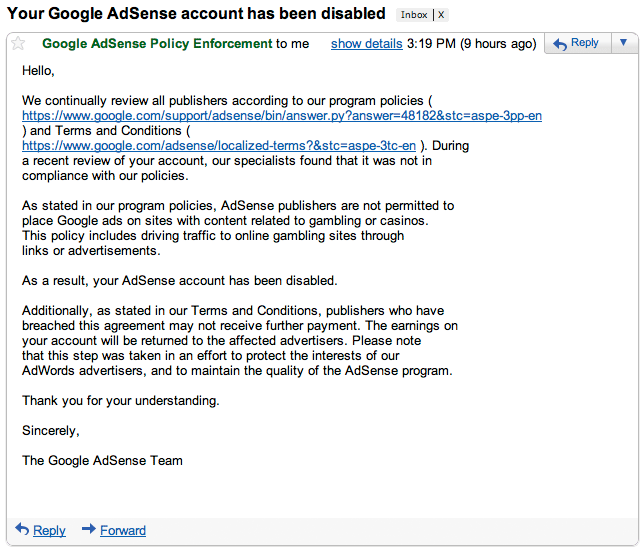
Fast forward a couple days and I get this email from Google letting me know my account is now disabled because of violations of program policies… specifically, AdSense publishers are not permitted to place Google ads on sites with content related to gambling or casinos. I *still* don’t own a gambling/casino related site (nor have I ever), so I’m assuming it’s related to the 30 warnings I got in the last month for someone else trying to run my publisher ID on their sites.
While I still think the majority of people who claimed to have their AdSense account unfairly terminated are probably just whiners that got caught doing something they shouldn’t be, I can say for 100% certainty now that it can (and clearly does) happen sometimes.
I guess it’s time to finally start managing advertising in-house… Just one more thing to add to the “to-do” list. /sigh
So I think I decided what I want for Christmas… A Scubacraft (I saw it in Wired magazine).
It’s basically a boat that you can hit a button, and it will go underwater (up to 100 feet). It would be pretty awesome to go scuba diving and instead of leaving your boat at the surface, just take it under water with you when you get to the dive site. 🙂 It’s not pressurized, so it’s not a submarine (you would still need scuba gear of course).
It also has an onboard computer that controls your ascent and descent so you don’t go to quickly and give yourself the bends.
It seems Google has quietly raised it’s limitations on how deep you can look into search results for the AJAX Search API. It’s always been 4 pages (8 results per page), so you could only see the first 32 results.
All of a sudden it was changes to 8 pages (still 8 results per page), so now you can look at the first 64 results. This is quite handy.
Someone I know uses iPhoto, but the Faces part of it wasn’t working. New pictures wouldn’t get scanned for faces and the spinning icon next to the Faces label on the navigation bar would just spin forever (and apparently it’s always been stuck like that).
I Googled the issue, and came up with hundreds of people having the same problem, but no one seemed to figure out a solution.
After a lot of digging and poking around, I think I found the solution. She imported large folders into iPhoto from her old photo management application, and she had some movies in her photo folders. So this is how I fixed it…
Quit iPhoto first.
Then get into the guts of your iPhoto Library (right-click the iPhoto Library file in your Pictures folder and do “Show Package Contents”).
Go to the Originals folder in there and get your movies out of there.
Delete the face.db and face_blob.db files.
Load iPhoto up and it will start scanning all your faces and with any luck actually get through them all and be kosher going forward.
Warning… this will delete all your face tags you had previously (so don’t do it if you tagged a bunch of people manually and don’t want to lose that).
I haven’t posted a random email in awhile, so here’s a new one…
Hello,
I am Mr Mark Jo—-, I will like to make reservation for 6 people that will be coming for vacation in your area on the 20th November to 30th November 2009.
If you have vacancy for the specified period, give me the total cost for the whole period of 10 nights, with either 6 single rooms or 3 double rooms for 6 guests.
Number of Persons: 6
Mr & Mrs Alb—-{37 and 33yrs}
Mr & Mrs Ben—-{40 and 36yrs}
Mr & Mrs Ari—-{44 and 38yrs}
Arrival date: 20th November 2009
Departure date : 30th November 2009.
Number of days: 10 days
Number of Guest: 6,
Confirm availability and get back to me with your rates and total cost and if you will accept major credit card for your payment and convert the total price to British Pounds or Euro.
Thank you and looking forward to hear from you soon.
Regards,
Mark
I’m open to suggestions on how much I should charge these guys to stay at my home… let me know.
The first Monday Night Football of the season, and it’s the Chargers vs. the Raiders. lol
The Chargers play the Raiders twice a year (being in the same division and all), and the Raiders haven’t won since 2002. So uh… yeah… If you are a Raiders fan, good luck on Monday. 🙂
So here’s the deal… Google is really good at determining relevancy of a webpage and what a webpage is about. Maybe they should modify their algorithms a bit to detect crazy people automatically.
I know Alexa data isn’t terribly accurate, but for sites under an Alexa rating of 500 *and* within the same market, it’s pretty accurate as far as relative traffic to sites you are comparing. That being said, how long do you think before they sell it or shut it down?
Their traffic is almost cut in half from a year ago (and still dropping)…

 I was going to buy a Nimitz class aircraft carrier today, but instead I bought lunch at Rubio’s.






 The first Monday Night Football of the season, and it’s the Chargers vs. the Raiders. lol